// Singularity documentation
The ticket, end to end
In Singularity, a ticket is a tracking card, the specification read by the agent, and the thread that preserves its exchanges and result.
When AI creates more tickets
The agent can create child tickets to split a mission into independent tasks. Each child has its own card, description, agent, and result. The parent can keep working, monitor children, and send instructions; it resumes synthesis as their results arrive.
A child description must stand on its own: goal, scope, constraints, and acceptance criteria. Splitting is limited to three levels and five unsettled children per parent. A completed child does not close the parent, which verifies the results and completes its own mission.
A follow-up ticket records separate work discovered along the way. A dependency expresses a prerequisite and can reference an existing ticket without making it a child. For example, documentation can wait for a feature while frontend and API children work in parallel. Work reserved for a person can be represented by a User Actions ticket when that plugin is active.
Ticket anatomy
The numbered label identifies the ticket. The title summarizes the outcome and the description provides context. Priority is low, medium, high, or critical. Tags classify work and affected projects identify repositories.
The eight types are feature, bug, refactor, doc, test, ia, session, and user-action. The last represents human work and appears when the User Actions module is enabled.
The exact six statuses are todo, in_progress, working, pending, done, and failed. in_progress means it is being taken on, working marks an active run, and pending an explicit wait.
Open a ticket
Double-click a Mission Control card. Its detail opens as a deck tab: keep it beside the editor, terminal, or another ticket without losing context.
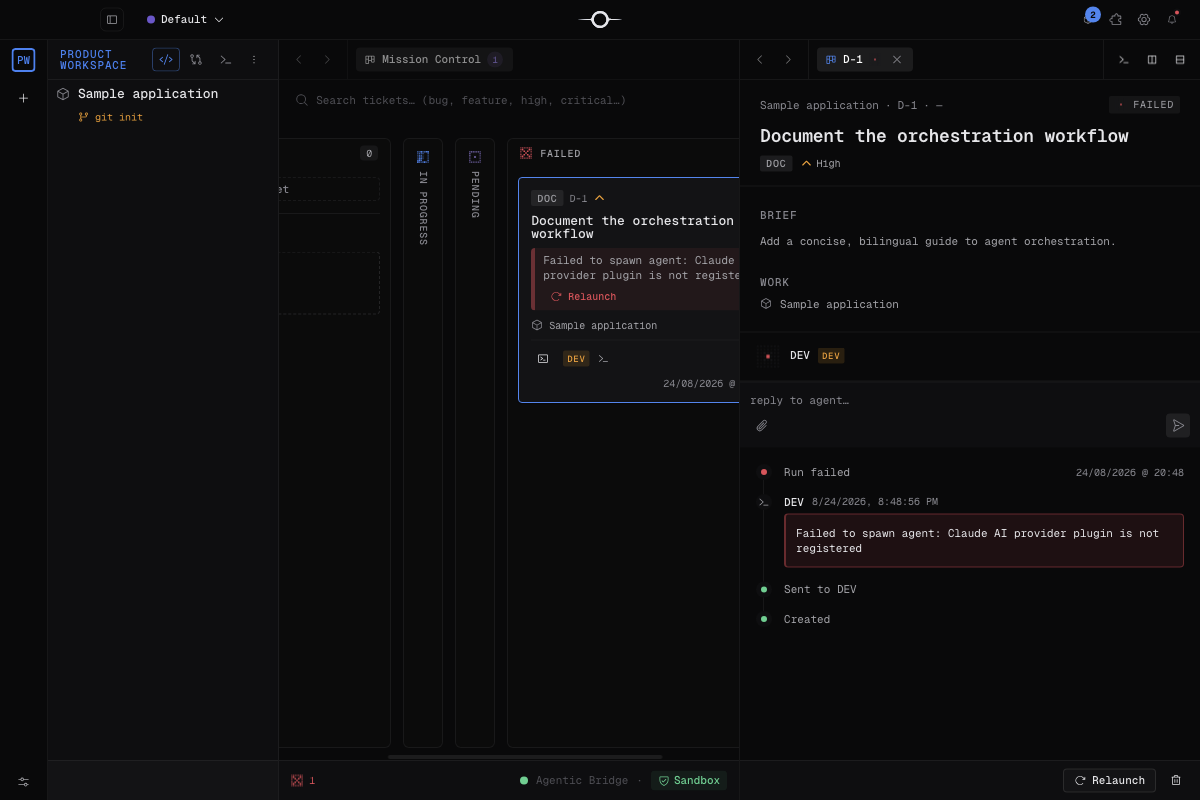
The description
The description is the main instruction read by the agent. Provide the context and observed problem, state verifiable acceptance criteria, then name what is out of scope. Add useful paths or commands without prescribing an implementation when only the outcome matters.
A good description explains what must change, how success is checked, and what must remain untouched.
How do you write a ticket for an AI agent?
A verifiable ticket describes the current problem, expected result, scope, exclusions and observable criteria with verification commands. This fictional, anonymized example contains no customer data and imposes no specification syntax.
Use a demonstration Git repository with Node.js 22 or later and check that the two paths below are unused. Create a ticket in Mission Control, enter its title, type and priority in their fields, then copy the remainder into the description. For a real project, adapt paths, prerequisites and commands before starting the agent.
Title: Normalize whitespace in a label
Type: feature
Priority: low
Project: the demonstration repository open in Singularity
Dependencies: none

Current problem
This demonstration Git repository has no normalization function.
A label entered with extra whitespace would be kept unchanged.

Expected result
Create normalizeLabel(text), exported from src/normalize-label.mjs:
trim leading and trailing whitespace, then replace each run of
whitespace (spaces, tabs, line breaks) with a single space.
Preserve case and accents.

Scope
Create src/normalize-label.mjs and test/normalize-label.test.mjs.
Use Node.js 22 or later, node:test and node:assert/strict.
Inputs are strings only. No dependencies to install.

Out of scope
No UI, database, network calls, edits to existing files,
handling of other input types, or publication.

Acceptance criteria
1. "  Bonjour   équipe  " becomes "Bonjour équipe".
2. "" and a whitespace-only string become "".
3. Tabs and line breaks between two words become a single space;
   "Équipe A" remains "Équipe A".
4. Automated tests cover every case above and pass.
5. The final diff contains only the two files in scope.

Verification from the repository root
node --version
node --check src/normalize-label.mjs
node --test test/normalize-label.test.mjs
git diff --check

Expected report
List commands run, their results and the files created.
If a command fails, preserve the error and explain the limitation.
Read both files in the Review tab and check the scope before
integration; a passing command does not validate the whole diff.
Criteria 1–4 are checked by tests; criterion 5 is checked in the Review diff. The agent runs these commands after creating the files; this example does not claim to report a real run.
Attachments
Drop a file or image into the creation form, or use the add button. Images, PDFs, and text can be previewed in the detail. During a run, Singularity exposes their list to the agent, which can read them through the session gateway or the provided local path.
Use minimal, anonymized examples: screenshots must not reveal secrets or real ticket content.
Dependencies and child tickets
The Blocked by field links prerequisites. The ticket launches only when they are complete and, if they produced a worktree, integrated.
A complex ticket can be split into children. Its parent keeps their links and can keep working. When waiting for children, it moves to pending, then resumes to synthesize their results.
Scheduling
A due date records the target without launching work. A schedule programs a recurring daily or weekly run at the selected time. Start the first occurrence immediately, then pause, resume, or remove the schedule.
The conversation thread
The thread preserves attempts, messages, and agent replies. Write to clarify an active run. If the agent asks a blocking question, the ticket moves to pending: your answer returns to the same session with its context.
On a done or failed ticket, a new message or relaunch starts another attempt without erasing history.
The result
The final report explains what was delivered, which checks ran, and any limitations. It stays in the detail and feeds review when enabled.
The short resolution is a plain-text sentence under 120 characters, shown in bold on the completed card so the Done column is easy to scan.
Frequently asked questions
What does the agent read before it starts?
It receives the title, description, attachments, dependencies, and ticket context. A self-contained, verifiable description reduces back-and-forth.
Can I resume a completed ticket?
Yes. Send a new message or relaunch the ticket: Singularity keeps the history and opens a new attempt with your additional instruction.