// Singularity documentation
Mission Control & the Kanban board
Mission Control is the operational home view for every workspace. The board brings tickets, priorities, and agent states together so you can immediately see what is ready, active, blocked, or complete.
Mission Control
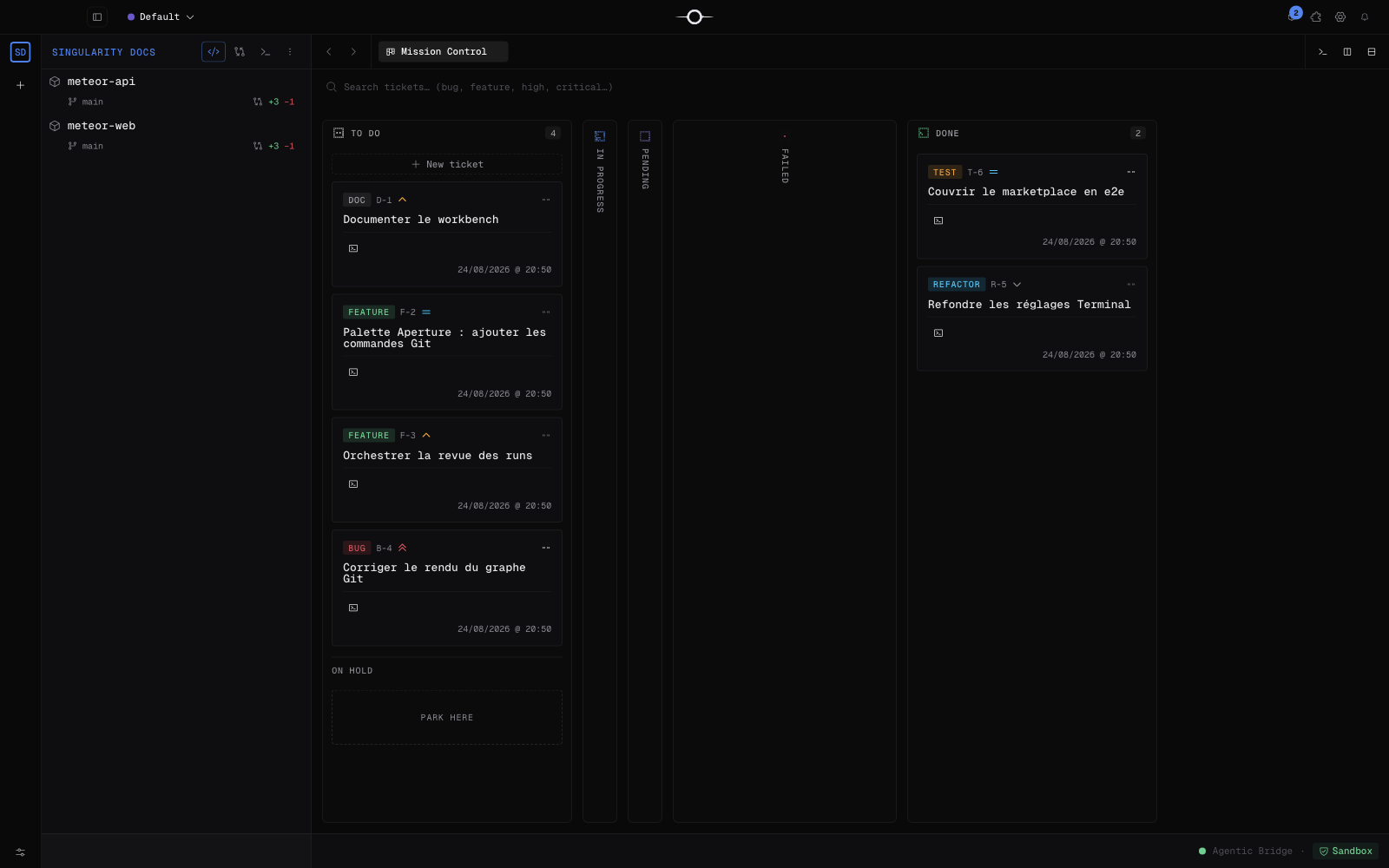
Mission Control opens the active workspace's board. At a glance, you see projects, their branches and Git changes, tickets grouped by state, and agents that are working or need your attention.
Search and board commands remain available above the columns. Click a card to open its detail; terminals and other tools remain available in the workbench.
The columns
The main flow has Todo for ready work, In progress for work being taken on or prepared, Pending for a paused but recoverable run, Failed for a run stopped by an error, and Done for completed work. The technical Working state identifies an active agent.
Pending is not a failure. The agent may be waiting for an answer, a review, child tickets, a conflict, or the commit queue. Human intervention appears under User action. In Todo, On hold deliberately parks tickets: they remain visible but are no longer scheduled.
A ticket card
A card condenses a public reference such as A-2478, title, type, priority, and worked-on projects. The letter comes from the type—feature, bug, refactor, documentation, test, AI, or session—while a parent ticket uses P.
During a mission, the activity chip reports the agent phase: reading, writing, testing, committing, or waiting. In Done, the short resolution summarizes the outcome without opening the detail.
Create a ticket
Click New ticket in Todo. Only the title is required. You may add a description, attachments, tags, dependencies, type, priority, agent and model, target device or branches, and schedule the start when that feature is active.
Create saves without starting an agent; Create and send immediately assigns the ticket to the configured agent.
Move, filter, and sort
Drag a card to a column to change its state, or within its column to change its order when manual sorting is available. Invalid destinations remain disabled to preserve the run lifecycle.
The toolbar searches and filters tickets. Its sorting controls reorder the view; in Done, last-modified ordering keeps recent results first.
The board at scale
Each column has its own vertical scroll area, so one long list does not stretch the other columns. The board also scrolls horizontally when the window cannot display everything.
Done lazily renders cards in batches of 20, then reveals further batches as you scroll. Archived tickets stay outside the current board.
Board settings
Under Settings → Kanban, the actual list is:
- Ticket detail layout: single or split view.
- Maximum concurrent agents.
- Maximum retries: from 0 to 10.
- Automatically accept splits, when prequalification is available.
- Automatically accept tickets created by agents.
- Automatically prioritize bugs.
- Ticket status-change sound.
Worktree, agent, and plugin settings live in their dedicated panels.
Frequently asked questions
What is the difference between Pending and Failed?
Pending means a run is paused but recoverable: the agent may be waiting for your answer, a review, child tickets, or the commit queue. Failed means the run stopped with an error and must be relaunched or corrected.
Why are all Done tickets not displayed immediately?
Done renders cards in batches of 20 to keep a large board responsive. Scroll down the column to load further batches.