Google Antigravity appeals to developers who want to hand whole tasks to an agent rather than complete code line by line. Launched in preview in November 2025 as an "agent-first" IDE, it became a family of tools in May 2026: the Antigravity 2.0 desktop app, a CLI, a standalone IDE, extensions for other editors and an SDK.
Singularity starts from the same observation: working with agents no longer fits in a chat window. So the real decision is not whether agents are available, since both offer them, but the unit of work (conversation or ticket), how models are chosen (one platform's models or several providers' CLIs) and how changes make their way back into your branch.
Comparison checked on 10 October 2026 against Google Antigravity's official documentation and Singularity's own. Model catalogue rechecked on 27 October 2026. It compares workflows, not speed or generated-code quality. Public prices in USD/EUR as displayed, excluding tax and usage; they may change.
In short
- Antigravity organises work as conversations inside projects, with subagents, reviewable artifacts (plans, walkthroughs, screenshots, browser recordings) and an agent that can drive Chrome.
- Singularity organises work as tickets on a Kanban board: every run gets its own Git worktree, reports its activity and goes through a Review tab before being rebased in.
- Antigravity supplies its own models (Gemini, plus Claude and GPT-OSS depending on plan), drawn from its quotas; Singularity bundles no model and drives the CLIs of seven providers using your accounts.
- Both run on macOS, Windows and Linux. Antigravity is free with quotas and scales up through Google AI plans; Singularity is free, with a 24 EUR per month per workstation licence for paid plugins.
What Google Antigravity is
Google introduced Antigravity on 18 November 2025 as an agentic development platform: an IDE paired with an Agent Manager, described as mission control for spawning and observing several agents across workspaces (launch post). On 19 May 2026, Antigravity 2.0 replaced that Agent Manager with a separate desktop application, with no built-in editor, that groups agents by project. The Antigravity IDE is still available but is not supported for enterprise customers.
According to the agent overview, the agent is a multi-step reasoning system that uses tools, including the browser, and produces artifacts. The Antigravity 2.0 overview adds that it runs commands, reads and writes files, browses with Chrome, uses skills and MCP servers, manages subagents and writes implementation plans, synchronously or asynchronously.
A project can span several folders, and each conversation works either directly in them or in a new Git worktree. Subagents are background sessions delegated by the main agent and can be defined in Markdown; Google ships three (research, browser, self). The /teamwork-preview command, in preview on paid plans, coordinates specialised roles on long-running work.
The agy CLI shares the same agent core and succeeds Gemini CLI. Browsing happens in a separate Chrome profile, and artifacts let you comment on a plan before any edit. The Models page, checked on 27 October 2026, distinguishes Gemini 3.8 Flash (all plans), Gemini 4 Argon (paid Pro or eligible premium-device trial, Ultra, Enterprise), and Gemini 3.7 Flash, 3.6 Flash, 3.1 Pro (Enterprise). Claude 5.5 requires paid Pro, Ultra or Enterprise. Claude 4.6 and GPT-OSS remain plan-dependent, with removal announced for 2 November 2026. Check this matrix before subscribing. Finally, Remote Control lets you follow a session from a browser.
Singularity at a glance
Singularity is a desktop ADE (Agentic Development Environment) made by Meteor Factory: an editor with language servers, a native terminal, a Git client (graph, diffs, stash, worktrees), multi-project workspaces and a Kanban board that acts as the execution surface for agents. A ticket carries the description, priority, dependencies and agent configuration; it then keeps the report, blockers and a short resolution. With worktrees enabled, every run works in its own Git checkout and its commits are rebased onto the base branch, automatically or after review. Singularity drives the CLIs of seven providers (Claude Code, Codex, Copilot, Cursor, Gemini, Mistral, Ollama) with your own accounts. The app is free; the licence only unlocks paid plugins from the Marketplace, such as Pipelines.
Comparison table
| Criterion | Singularity | Antigravity |
|---|---|---|
| Product type | Desktop ADE: editor, terminal, Git client, LSP and a Kanban board that drives agents | Google's agentic platform: Antigravity 2.0 app, agy CLI, standalone IDE, IDE extensions and SDK |
| Entry point | A ticket: description, priority, attachments, dependencies, agent and model | A conversation with the agent in a project, optionally started with a command such as /goal |
| Agent execution | Provider CLIs launched on your machine, optional sandbox (Seatbelt on macOS, Landlock on Linux) | Google's agent harness on your machine; terminal sandbox on by default on macOS and Linux with the Default preset |
| Parallelism and isolation | One worktree and branch per run, concurrent-agent limit, ticket dependencies | Parallel conversations, subagents, "New worktree" mode per conversation |
| Work tracking | Todo, In progress, Pending, Failed, Done columns, activity chip, report and short resolution | Conversations, subagent panel and artifacts (plans, walkthroughs, screenshots, recordings) |
| Review and Git integration | File-by-file Review tab, notes, partial merge, rebase onto base and commit queue | Git panel (Agent Edits, Uncommitted, Branch views), diff comments, staging and commit |
| Models and providers | Claude Code, Codex, Copilot, Cursor, Gemini, Mistral and Ollama, with your accounts | Gemini 4 Argon and 3.8 Flash; other models depend on plan (27 October 2026); no personal keys to extend limits |
| Extensions | Singularity Marketplace (not VS Code compatible), per-session MCP tools | Plugins (skills, subagents, rules, MCP, hooks) and a built-in marketplace |
| Platforms | macOS (Apple Silicon, Intel), Windows (x64, ARM64), Linux (AppImage, .deb) | macOS, Windows and Linux (x64, ARM64); remote follow-up via Remote Control |
| Pricing | Free app; 24 EUR per month per workstation licence for paid plugins; AI subscriptions separate | Individual plan at $0; higher quotas with Google AI Pro or Ultra; business plans via Google Cloud |
The same feature in both tools
Take a common request: add a CSV export of invoices, with an API endpoint and a button in the UI.
With Antigravity
You open a project containing backend and frontend, then start a conversation in "New worktree" mode. The agent writes an implementation plan you comment on before it edits files. It can hand codebase exploration to a subagent, write the endpoint and the button, start the local server and check the screen in Chrome, with screenshots and a recording. You review and comment on diffs, then stage and commit from the Git panel. The documentation we checked does not describe merging the worktree branch back, so plan your own merge or pull request step.
With Singularity
You create two tickets, "CSV export endpoint" and "Export button", with the second blocked by the first. The scheduler starts the API ticket; the agent works in its worktree, publishes its phase (reading, writing, testing, committing) on the card and ends with a report. With auto-merge off, the result waits in the Review tab: you approve file by file, annotate a selection or send the run back with feedback. After the rebase, the UI ticket starts from a base that contains the endpoint. Singularity has no agent-driven browser, so visual checks rely on your tests or your own eyes.
Antigravity emphasises evidence produced during the conversation; Singularity emphasises breakdown, execution order and control over integration.
Agents, subagents and parallelism
In Antigravity, parallelism mostly comes from the agent: it spawns subagents, which inherit its permissions, to explore code, generate several files or test in the browser. Several conversations can also run at once, each in its own worktree if you choose.
In Singularity, it is driven from the board: each ticket has its own provider and model, the number of concurrent agents is configurable and dependencies hold a ticket back until its prerequisites are integrated. A complex ticket can be split into children whose results the parent synthesises. One splits work inside a task; the other organises a portfolio of tasks.
Review, Git and integration
Antigravity strengthened its Git panel in August 2026: views of the agent's edits, uncommitted changes and the branch, split or unified diffs, staging and a generated commit message. Diff comments feed instructions back to the agent.
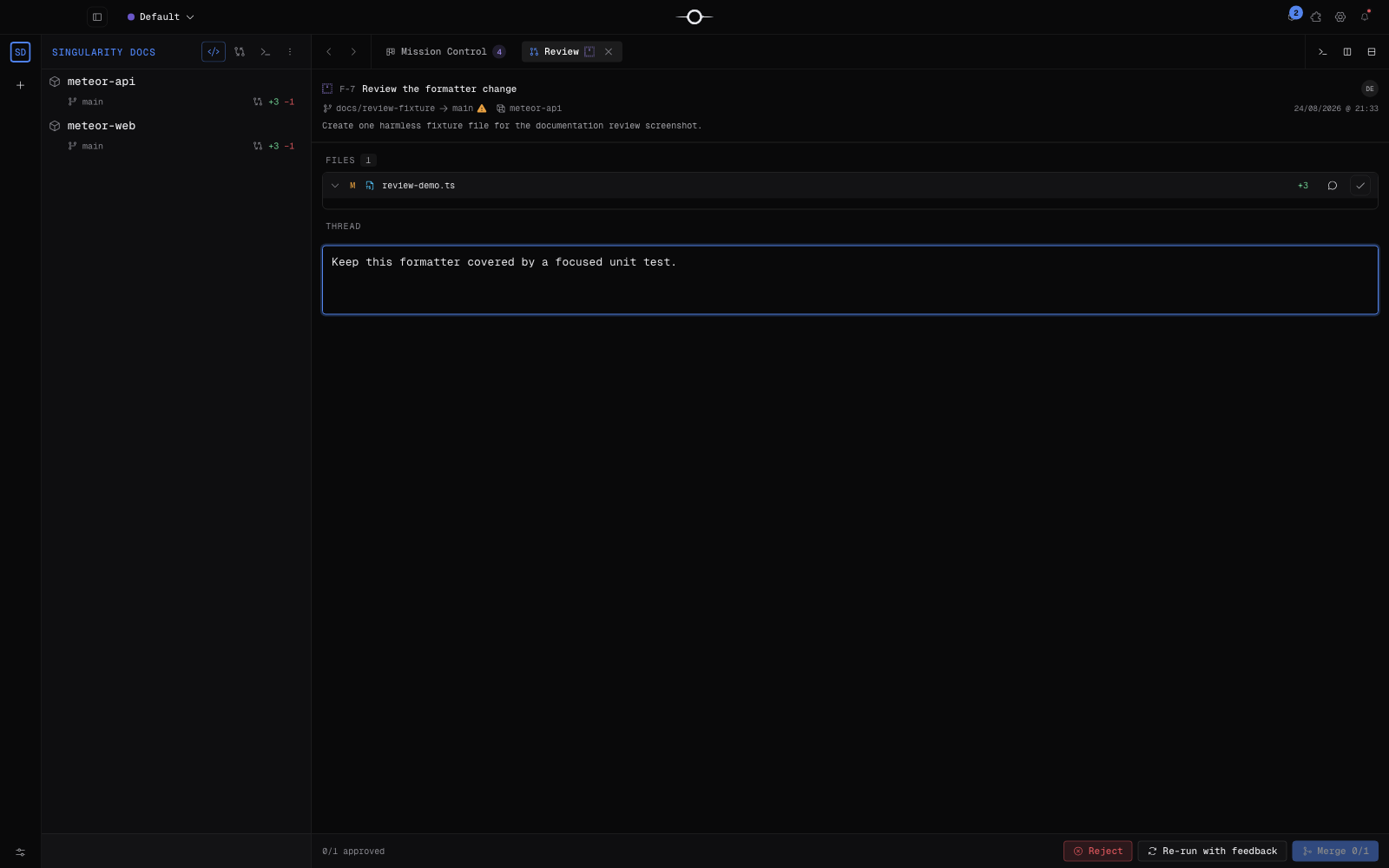
Singularity makes integration a step of its own: the Review tab lets you approve each file, edit in the worktree, merge only approved files or relaunch with feedback. Integration uses a rebase to keep history linear, and a commit queue serialises concurrent integrations on a project. That does not remove conflicts or regressions: tests are still needed after a rebase.
Models, quotas and cost structure
Antigravity works with a personal Google account in eligible countries (FAQ). Its pricing page shows an individual plan at $0 per month with weekly limits, then higher limits with Google AI Pro and Ultra, which Google lists in the US at $19.99 per month and from $99.99; those subscriptions also cover other Google services. The Plans page explains that quotas refresh over five-hour and weekly windows, that AI credits can take over, and that bringing your own key or endpoint for extra rate limits is not supported. Teams go through Gemini Enterprise, from $30 per seat per month or pay-as-you-go.
Singularity keeps the tool and inference separate: the app is free, with unlimited agents, projects and worktrees, and the 24 EUR per month per workstation licence (14-day trial) only covers paid plugins. Model costs depend on the subscriptions you already hold with each provider, and the model is chosen ticket by ticket.
Where agents run and where data goes
In both cases the agent runs on your machine and model calls go to a provider. Antigravity uses the models Google offers; its FAQ says data collection can be turned off in settings. Its terminal sandbox relies on Seatbelt on macOS and namespaces on Linux, and is off by default on Windows.
Singularity does not upload your code on its own: only the CLIs you configured talk to their services, under their own policies. With Ollama running locally, inference stays on the machine; app data lives in a local SQLite database.
Where Antigravity is stronger
- Browser verification: the agent opens Chrome, tests the UI and leaves screenshots and recordings as evidence.
- Artifacts: commentable plans and walkthroughs make the agent's reasoning reviewable before and after code is written.
- Bundled models: no third-party subscription to set up to get started, with a free plan and tight Gemini integration.
- Many surfaces: desktop app, synced CLI, extensions for VS Code, Visual Studio, JetBrains, Zed and Xcode, and remote follow-up from a phone.
- Built-in orchestration: customisable subagents and a Teamwork mode for long projects.
Where Singularity stands out
- The ticket as unit of work: priority, dependencies, child tickets, recurring schedules and the report stay attached to the task, visible on a board.
- Isolation by default: with the setting on, every run gets a worktree, with no choice to repeat per conversation.
- Controlled integration: file-by-file review, partial merge, linear rebase and a commit queue.
- Provider choice: seven providers, including local models through Ollama, using the accounts you already have.
- A complete environment: editor, LSP, terminal and Git client in the same window as agent tracking.
Can you use both?
Yes, on the same repository: an Antigravity project can point at the folder Singularity uses, and Singularity worktrees are ordinary Git folders. Keep Antigravity for tasks where visual checking matters, and Singularity for planning and integrating a batch of tickets.
For Gemini models, Singularity drives Gemini CLI, Google's open-source tool, which is still actively released. Antigravity's FAQ, however, forbids accessing Antigravity through third-party software, so Singularity does not drive Antigravity itself. See also Singularity vs Cursor and Singularity vs Kiro.
Which tool should you choose?
- Frontend developer who wants visual proof: Antigravity, for its browser agent and recordings.
- Solo developer already on Google AI Pro: Antigravity works without any provider setup.
- Small team managing a backlog: Singularity, for the board, dependencies and review before integration.
- Someone already using Claude Code, Codex or Copilot: Singularity, which reuses those accounts instead of adding a new one.
- Need for local models: Singularity with Ollama, straight from the board; Antigravity's local-model page covers its Python SDK.
Reproducible local trial: what does the CSV export produce?
On 11 October 2026, a limited technical trial produced a working CSV endpoint and download link: 5 passing Node tests and a download checked with Playwright. It uses four synthetic invoices, not a production billing application. Antigravity was not run; its features are still described from official documentation.
Method, versions and scope
A Codex agent implemented and ran the example in the isolated worktree of Singularity ticket F-3957. Installed application: Singularity 2.18.60 (read from Info.plist, not certification of all features). Environment: macOS 27.0.1, Node.js 26.11.1 and Playwright 1.59.1. The API in csv-trial v1 has no dependencies. See the execution record for versions and source hashes.
The agent wrote GET /api/invoices.csv and a page with an export link, then ran the tests. Acceptance checks cover headers, filename, accents, commas, quotes and embedded newlines. Formula prefixes receive an apostrophe, intentionally changing these values. The server only binds to 127.0.0.1.
Observed results
- Node tests: 5 passed, 0 failed. Empty export, escaping, formula prefixes, exact HTTP response, unsupported routes and methods.
- Browser test: clicked the link, downloaded
invoices.csvand compared all expected bytes, including the four invoices. Playwright is external to Singularity. - Review and integration: two dependent tickets, manual approval and partial integration were not exercised. They remain steps for the full protocol below.
Save the server with synthetic fixtures and Node tests in one directory. Run node --test server.test.mjs, then node server.mjs and open http://127.0.0.1:4317. The reproduction guide gives commands and limitations. Replaying the final code needs no API key or provider account.
Limits and documentary comparison
One example, one environment, synthetic data: no authentication, database, load testing, Excel validation or security audit. No generation time, cost, quota, agent success rate or productivity gain was measured. Tests verify the final code, not reproducibility of model decisions. No exported log attests the exact model version.
Official Frontend and Artifacts pages were read again on 11 October 2026. They describe captures and reviewable deliverables; these are documentary descriptions, not results obtained with this scenario. The trial establishes no superiority of either tool.
Trial protocol
- Pick a real feature that touches an API and a UI, with written acceptance criteria.
- In Antigravity, start a conversation in "New worktree" mode, comment on the plan, and note the time spent reviewing and integrating.
- In Singularity, split the same request into two dependent tickets, turn auto-merge off and review each run in the Review tab.
- Run the same test suite on both results and compare the Git history each produced.
- Record quota or credit usage for every provider involved.
Frequently asked questions
Is Antigravity free?
There is an individual plan at $0 with weekly limits. Google AI Pro and Ultra raise those limits and give access to credits; quotas also depend on how much work the agent does.
Can Singularity use Gemini models?
Yes, through Gemini CLI installed and authenticated on your machine. Singularity discovers the models that CLI allows; it does not drive Antigravity or its agy CLI.
Do both tools isolate agent work?
Yes, with Git worktrees in both cases. Antigravity offers "New worktree" mode when you start a conversation; Singularity creates a worktree for every run when the setting is on, then rebases the result onto the base branch.
To go further, browse all Singularity comparisons, read the getting started guide, or download Singularity to try the board on your own repository.