Do you know about Makefiles? Justfiles, maybe?
Originally a Makefile was built to automate compiling programs. Instead of retyping the whole command with the names of every file to compile, you stacked the references in this file so that, in the end, a plain make built your app.
From that principle, you can perfectly well use a Makefile to hold any command — builds, dev, tests and the rest — and run them cleanly through that single file. And that, on any tech stack.
What about the Justfile? The principle is roughly the same: one file, named "recipes", a short command to run them (just dev, just test…). Just is simply more modern and more readable than Make for this single task-runner job.
The problem it solves
On a real project, the everyday commands are long, hard to memorise and different from one repo to the next. npm run dev here, cargo run --release there, xcodebuild -scheme … -configuration … elsewhere. Multiply that by ten projects open in parallel and you spend your time wondering "what was the command to start the dev server again?".
A Makefile or a Justfile fixes that by setting a shared vocabulary per project: dev, test, build, lint, clean. The same gesture, whatever sits underneath.
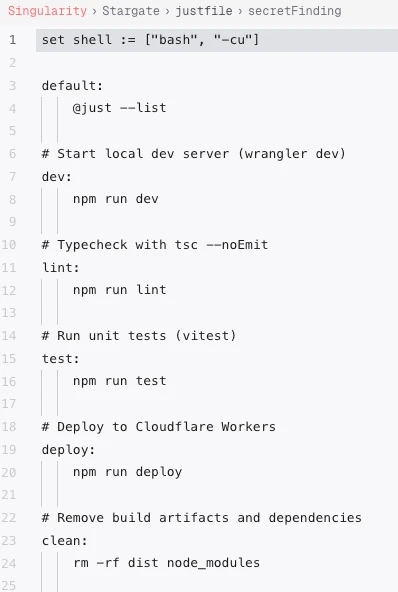
In Singularity: the file becomes a launcher
This is where Singularity comes in. We integrate Makefiles and Justfiles to get one-click app launchers, right inside the IDE. Yes… like in Visual Studio.
Concretely, Singularity detects the file at the root of your project and pins it at the top of the tree, as a row of its own — a "locked file" that stays visible. Each recipe becomes clickable: a play button, you press it, it runs. No more opening a terminal, hunting for the right command, retyping it without a typo.

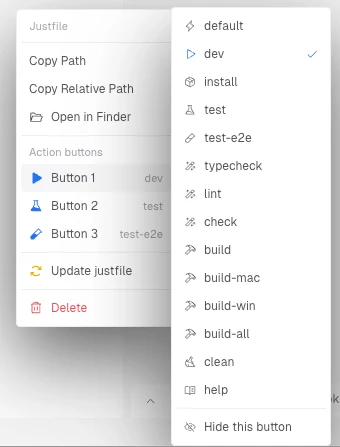
Three action buttons, your recipes at hand
Not all recipes are equal. The ones you run twenty times a day — dev, test, test-e2e — deserve better than a trip through a menu. Singularity lets you configure three action buttons per file: you assign each one the recipe of your choice, and it runs in a single click.
The rest of the recipes (install, typecheck, lint, build, build-mac, clean, help…) stays available in the file's dropdown menu. Nothing is hidden, but the essentials are up front.
No Makefile? The AI writes it for you
Best for last: you don't have to write these files yourself. Plenty of developers never took the time to learn Make's or Just's syntax — and that's perfectly fair, it isn't the core of their job.
In Singularity, you ask and the AI handles it: it inspects your project, understands your stack, and generates the Justfile (or Makefile) with the right recipes — dev, test, build, lint — wired to the right commands. You get a clean, commented file, ready to run.
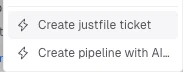
And since it's just a text file, you stay in control: you review it, you tweak it, you commit it with the rest of the project. The AI does the first draft, you own the result.
Why it's more than a shortcut
A play button next to a recipe sounds trivial. It isn't.
For you, it's less friction: zero commands to memorise, zero typos, the same gesture across all your projects.
For your team, it's executable documentation: the Justfile says, in black and white, how to run, test and build the project. A newcomer no longer has to ask — they click.
For AI agents, finally — and that's the whole point of an Agentic Development Environment — these recipes become reliable entry points. When a command has a stable name and known behaviour, an agent can run it, read the result, and move on. The Justfile isn't just human comfort: it's also the contract the AI follows to run your project.
Frequently asked questions
What's the difference between a Makefile and a Justfile?
Both group named commands ("recipes") behind short shortcuts. Make is the historical tool, designed first for compilation, with sometimes tricky syntax (tabs, variables). Just is newer and meant purely as a task runner: simpler syntax, clearer reading. In Singularity, both work the same way as one-click launchers.
Does Singularity support both formats?
Yes. Singularity detects both a Makefile and a justfile at the project root, pins it at the top of the tree, and exposes each recipe as a clickable launcher, with up to three configurable action buttons.
Do I need to know Make or Just syntax to benefit from it?
No. Singularity can generate the file for you via AI: it analyses your project, infers the right commands (dev, test, build, lint) and writes a clean, commented Justfile or Makefile. You review and adjust it if needed, but you have nothing to learn to get started.
Does it work with any technology?
Yes. A task runner is language-agnostic: it just executes shell commands. Node, Rust, Go, Swift, Python, a homemade script… if it runs in a terminal, it goes in a Makefile or a Justfile, and therefore in a Singularity launcher.