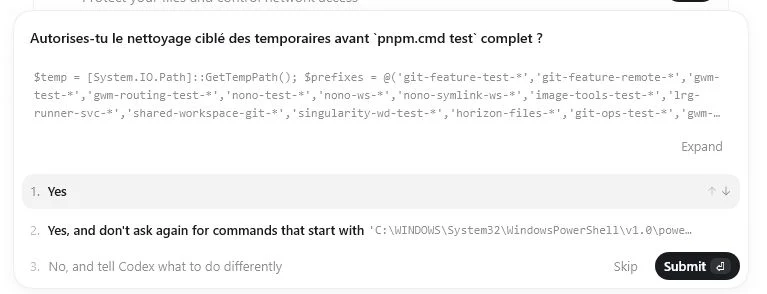
Are you frustrated too when an AI keeps asking you for "permission to edit file B" or your opinion on something obvious? You fire off a request, go grab a coffee, and when you come back… the AI hasn't moved: it's waiting for you to click "Yes".
Interactive vs non-interactive: it's about autonomy
One of the differences between an AI's interactive mode and its non-interactive mode is its autonomy to fulfil your request. In interactive mode, the AI stops at every crossroads and hands control back to you: "run the plan?", "execute?", "edit this file?". In non-interactive mode, it makes those calls itself and runs the task through to the result.
Interactive mode feels reassuring at first. But very quickly the constant back-and-forth becomes the bottleneck: it's no longer the AI working for you — it's you babysitting the AI.
Why Singularity exists
One of the reasons Singularity came to life is precisely this dependency of the AI on our answers. It takes forever to handle its prompts. It takes forever to watch every single line of code. Permission to launch a plan, to execute it, to touch this or that file… argh!
The starting idea is simple: what if we flipped the burden? Instead of supervising the AI step by step, we hand it a complete request and let it see it through. We judge the result, not every micro-decision along the way.
The ticket as the unit of work
With Singularity, it's simple. You write a spec, a request, a feature in a ticket — on the kanban. The AI runs it and builds the implementation it understood. Once the ticket is "done", the commit is made and an action report is written to explain what was done.
And if you don't like the result? You reopen the ticket and pick the conversation back up inside it. The ticket becomes the thread: you clarify, correct, relaunch — without ever having to sit glued to the screen during execution.
Concretely, Singularity is an Agentic Development Environment built on the kanban: each card is a task an AI agent owns end to end — write the code, test it, commit it — and that comes back to you once finished, with its report.
The perimeter as a guardrail
Letting an AI loose on its own is scary, and rightly so. Singularity's answer isn't to ask permission for every file again — it's to bound its perimeter. The agent is only allowed to touch the Workspace of its task. Not neighbouring projects, not whatever else is lying around on the machine.
That perimeter isn't just a guideline: it's a guardrail enforced automatically. Any access that tries to leave the workspace is blocked before it even runs. So autonomy isn't a blank cheque — it's bounded by default.
And that's the whole point: all the nonsense of absurd edit requests disappears. The AI is only allowed to touch the Workspace. And once it knows that, it moves fast, and so do you.
In short
The problem isn't that the AI asks for permission — it's that it asks for everything, all the time, and turns you into a supervisor. Singularity takes the opposite bet: you delegate a request in a ticket, the AI runs it autonomously within a bounded perimeter, and accounts for it at the end via a commit and a report. If something's off, you reopen and resume the conversation.
Tired of clicking "Yes" all day? Come try it. It's free.
Frequently asked questions
What's the difference between an AI's interactive and non-interactive mode?
In interactive mode, the AI stops at every decision (launch a plan, run a command, edit a file) and waits for your approval. In non-interactive mode, it makes those calls itself and runs the task through to the result. The difference comes down to one word: the AI's autonomy to fulfil your request without constant back-and-forth.
How does Singularity avoid permission requests in a loop?
You hand the AI a complete request through a ticket instead of approving it action by action. The agent runs the task autonomously, commits the result and writes an action report. You judge the result rather than validating every micro-decision along the way.
What happens when a ticket moves to "done"?
The commit is made automatically and an action report is written to describe what was done. That report, visible on the ticket, is what you use to judge the work — without having had to watch every line during execution.
What if the AI's implementation isn't what I wanted?
You reopen the ticket and resume the conversation inside it: you spell out what's wrong and the AI starts again from there. The ticket acts as a durable thread, so you don't have to re-explain everything each time.
Isn't letting an AI run autonomously risky?
It's bounded by the perimeter. The agent is only allowed to touch the Workspace of its task: any access that tries to leave it is blocked automatically, before execution. Autonomy isn't a blank cheque — it's bounded by default, which makes it usable without constant supervision.